








Can't Hear the Announcer at the Race? Here's the Fix
You're at the racetrack. The engines are roaring, the crowd is cheering, and the racing action is nonstop.
Then the announcer starts talking.
You catch a few words, but the rest gets lost under the noise of the engines.
Who is leading? Why is the caution out? What race is coming up next?
If you've ever struggled to hear the race announcer at a motorsports event, you're not alone.
Racetracks are loud environments, and even a good public address system can be difficult to hear when cars are on the track.
Fortunately, there's a simple way to hear more of what's happening on race day.
Why Is It So Hard to Hear the Announcer at a Racetrack?
Racing is loud. That's part of what makes attending a live motorsports event exciting.
But the same engine noise that creates an incredible atmosphere can also make it difficult to understand announcements coming through the track's PA system.
Several factors can affect how clearly you hear the announcer:
- Engine noise: Race cars can overpower announcements, especially during green-flag racing.
- Distance from speakers: Fans sitting farther from PA speakers may have trouble understanding commentary.
- Track layout: Large facilities, grandstands, buildings, and pit areas can affect how sound travels.
- Crowd noise: Conversations, cheering, and other activity can make announcements harder to follow.
- Speaker coverage: Some areas of a facility may receive clearer PA audio than others.
Even when the announcer is doing a great job, the surrounding noise can make it difficult for fans to hear everything being said.
Meet TrackTune: A Race Announcer App for Motorsports Fans
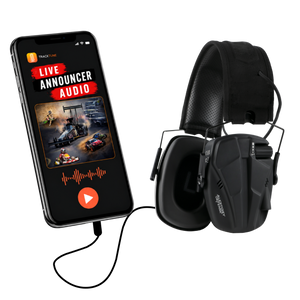
TrackTune is a motorsports audio platform that delivers live race announcer audio directly to your mobile device.
Instead of relying entirely on the racetrack's loudspeakers, fans can use the TrackTune app to listen to the announcer from their phones when a participating track's stream is live.
TrackTune is designed specifically for motorsports, making it useful for fans attending dirt track races, drag racing events, karting competitions, and other racing events where announcer audio is available through the platform.
The goal is simple: help fans hear the commentary and stay informed about what's happening throughout the event.
How Does TrackTune Work?
TrackTune connects to the announcer audio provided by a participating racetrack or racing organization.
That audio is streamed through the TrackTune platform and made available to listeners through the mobile app.
For fans, getting started is straightforward.
Step 1: Download the TrackTune App
TrackTune is available for iOS and Android devices.
Visit the TrackTune for Fans page to learn more about getting started.
Step 2: Find Your Racetrack
Open the TrackTune app and look for the participating racetrack or event you want to follow.
Select the appropriate track or event from the available options.
Not every racetrack broadcasts through TrackTune, so availability depends on whether the facility or event is participating.
Step 3: Get Your Audio Ready
Set up your preferred listening method before the racing begins.
If you're using headphones or earbuds, choose an option that allows you to listen comfortably while remaining aware of your surroundings.
Keep your phone charged so you can continue listening throughout the event.
Step 4: Listen to the Live Announcer
When your selected event's TrackTune stream is live, you can listen to the announcer audio directly through the app.
Depending on the event and what the announcer is covering, you may hear race commentary, competitor information, event updates, and other announcements.
That means you can spend less time trying to understand the PA system and more time following the racing.
Is TrackTune Free for Race Fans?
Yes. The TrackTune app is free for fans to download and use.
Participating racetracks and racing organizations provide the live announcer audio that fans can access through the app.
There is no need for fans to purchase specialized TrackTune broadcasting equipment.
All you need is a compatible mobile device, an internet connection, and access to an available TrackTune event stream.
Standard mobile data charges may apply depending on your phone plan.
Tips for Clearer Race Day Audio
Want to get the most out of TrackTune during your next trip to the racetrack? A few simple preparations can help.
Choose Your Listening Setup Before the Race
Get your phone and audio accessories ready before cars take the track.
That way, you won't have to adjust your setup while trying to follow the racing.
Use Appropriate Hearing Protection
Motorsports events can expose spectators to high noise levels.
Choose hearing protection suitable for the racing environment. If you want to listen through earbuds or headphones, consider hearing-protection products designed to accommodate audio listening.
Ordinary earbuds and headphones should not be treated as a substitute for adequate hearing protection.
Check Your Internet Connection
TrackTune streams audio to your phone, so an active internet connection is necessary.
Before the event starts, make sure your device has a usable connection through mobile data or an available Wi-Fi network.
Keep Your Phone Charged
A fully charged phone helps you avoid losing access to the stream during a long race program.
For longer events, consider bringing a portable battery pack.
Make Sure Your Track Is Broadcasting
TrackTune audio is available when a participating racetrack or event has an active stream.
If you don't hear audio immediately, confirm that you've selected the correct event and that its broadcast has started.
TrackTune Helps Fans Follow More of the Action
Live racing is about more than watching cars go around the track.
It's about understanding the competition, following your favorite drivers, and knowing what's happening as the event unfolds.
The announcer plays an important role in that experience.
TrackTune gives fans another way to hear that commentary, even when the racetrack environment makes traditional PA announcements difficult to understand.
Whether you're sitting in the grandstands or spending time in another spectator area, TrackTune can help you stay connected to the event when a live stream is available.
Can't Hear the Announcer? Try TrackTune at Your Next Race
The next time you head to the racetrack, don't let engine noise keep you from following the action.
With TrackTune, live race announcer audio can be available right on your phone.
Before your next event, check whether your racetrack participates in TrackTune and get the app ready for race day.
Ready to hear more of the race?
Want to learn more? Visit How TrackTune Works to see how the platform delivers live announcer audio to racing fans.


