







New to TrackTune? Start Here
You are at the track. The engines are running, the grandstands are loud, and the announcer is sharing information about the race. There is just one problem: you cannot hear everything coming over the PA system.
That is where TrackTune comes in.
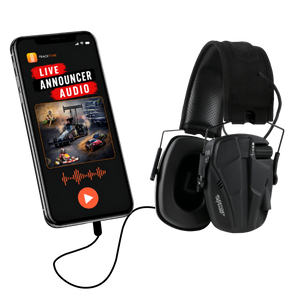
TrackTune delivers live race announcer audio directly to your mobile device, helping you hear and follow what is happening throughout race day. There is no special receiver for fans to carry. Just use your phone and your preferred headphones or earbuds.
If this is your first time using TrackTune, getting started is simple.
Step 1: Get the TrackTune App
Start by getting TrackTune on your mobile device before the racing begins.
Having TrackTune ready before you arrive means you can spend less time setting up in the grandstands and more time enjoying the event.
Visit TrackTune for Race Fans to find information about using TrackTune and getting started with the app.
Step 2: Find Your Track or Event
Once you are ready to listen, find your track or event in TrackTune.
Selecting the correct track connects you with the announcer audio being streamed from that facility. When the track is broadcasting, you can follow the same race calls and updates being made at the event.
If you do not immediately see your track, confirm that the facility uses TrackTune and that a TrackTune stream is available for the event you are attending.
Step 3: Connect Your Headphones or Earbuds
Next, connect your preferred headphones or earbuds to your phone.
You can use a compatible wired or wireless listening option depending on your device and personal preference.
At loud motorsports events, hearing protection is also important. Consider using hearing protection designed for racing environments rather than relying on ordinary earbuds alone.
Once your listening equipment is connected, set your phone to a comfortable listening level.
Step 4: Listen Live
Now you are ready for race day.
When the track's TrackTune stream is live, you can listen to announcer audio directly through your phone.
Instead of trying to make out the PA system over engines and crowd noise, TrackTune puts the announcer in your ears. Depending on the event, that can help you keep up with information such as:
- Driver and competitor information
- Starting lineups
- Race calls
- Cautions and restarts
- Schedule updates
- Results and finishing information
- Important track announcements
Use TrackTune Around the Track
One of the biggest benefits of receiving announcer audio on your phone is that you are not limited to sitting directly underneath a PA speaker.
You may be in the grandstands, walking through the facility, getting food, or spending time in another area of the track. TrackTune gives participating tracks another way to keep fans connected to the announcer feed.
This can be particularly helpful at large facilities and loud events where hearing every announcement through the traditional PA system can be difficult.
A Quick Race Day Tip
Do not wait until the feature is lining up to get everything ready.
Before heading to the track, make sure your phone is charged and bring the headphones, earbuds, or compatible hearing protection you plan to use.
When you arrive, look for TrackTune signs or QR codes around the facility. Tracks may use these signs to help fans quickly access TrackTune information.
Ready to Hear More of Race Day?
TrackTune was created around a simple goal: help race fans clearly hear and follow the action.
Getting started takes just a few steps. Get the app, find your track, connect your headphones, and listen when the TrackTune stream goes live.
Whether it is your first race or you are at the track every weekend, hearing the announcer more clearly can help you better understand what is happening on the track and throughout the facility.
Get Started With TrackTune and get ready for your next race.
Want to know more about what happens behind the scenes? Visit How TrackTune Works.


